 Worldwide Presence

Tips & Tricks - Keeping Fidelis Lucina Full of Energy

CAE Healthcare remains committed to helping our customers get the most out of their simulators. This is why we started the Tips & Tricks blog series; to provide accurate information and handy usage tips on some of the most commonly encountered issues. We will update often, so don't forget to check back.
For convenient access to this and other Tips & Tricks coming soon, subscribe to the CAE Healthcare Blog and/or click here and subscribe to our RSS feed!
Please note: If you are using Safari 6, you will need to have an RSS Reader downloaded to subscribe.
Tips & Tricks #12: Keeping the Fidelis Lucina Simulator Full of Energy
Pamela Azevedo, CAE Healthcare Product Manager (and a Fidelis Lucina expert) offers the following tips and tricks for keeping Lucina running smoothly:
You know that feeling you get when someone asks you to handle a complicated task, or to tackle serious work early in the morning, before you've had that first cup of coffee? Sometimes, Lucina feels that way, too!
Turning on the Lucina mannequin when the battery is less then 12% charged, and not plugged-in can prevent the unit from starting up properly.* If done repeatedly, it could cause Lucina's internal electronics to go into "Rescue Mode." This may shut down the entire system, requiring the intervention of a technician to get the simulator functioning once again.
So, what should you do to ensure that Lucina has enough energy and power to perform her important work?
Here are a few useful tips:
-
If you are unsure of the battery status, make certain the mannequin's
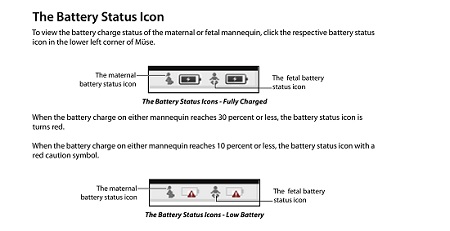 power supply is plugged-in when turning on the system.
-
To prevent unexpected battery depletion, fully power down the simulator after each training session.
- Always check battery status before unplugging the system.
Additional tips for the Lucina simulator may be found in your User Guide, or by contacting Customer Service.
Learn all about this phenomenal simulator!
Visit the all-new microsite: Fidelis Lucina-A Better Childbirth Simulator
Did you find this tip helpful? Please let us know!
Leave a comment below, or click to visit Konsiderate.com, and leave your own user review.
The Tips & Tricks section is located in our Resources section on caehealthcare.com. The Resources section of the website will also give you access to important and helpful documentation and video tutorials for your simulators. To access the Resources section, click on "Education" and then click on "Resources."
Questions or comments? Please feel free to post below and share this post on our social channels!
For more information on utilizing your CAE Healthcare simulator's features, visit the Video Tutorials section.
*Please note: This minor and temporary issue with the Lucina simulator will be addressed in the upcoming Müse software update. Stay tuned.