 Worldwide Presence

Tips & Tricks - Associated Waveforms of Pulmonary Artery Insertion
At CAE Healthcare, we care about our customers getting the most out of your simulator(s) easily and efficiently. That is why we have started an engaging new Tips & Tricks blog series. This series will cover multiple simulation solutions and will be updated often so don't forget to check back! For easy access to this and Tips & Tricks coming soon for other simulators, click here and subscribe to our RSS feed!
Please note: If you are using Safari 6, you will need to have an RSS Reader downloaded to subscribe.
Tips & Tricks #11 - Associated Waveforms of Pulmonary Artery Insertion
Being able to identify various waveforms associated with hemodynamic monitoring is a skill critical care and operating room nurses must understand. Instructors can now demonstrate the different waveforms associated with PA catheter insertion and the waveforms associated with dislodgement. This scenario has been programmed to demonstrate pulmonary artery catheter insertion and the waveforms associated with this procedure in the Muse software. The scenario automatically transitions after three to seven seconds in the different states.
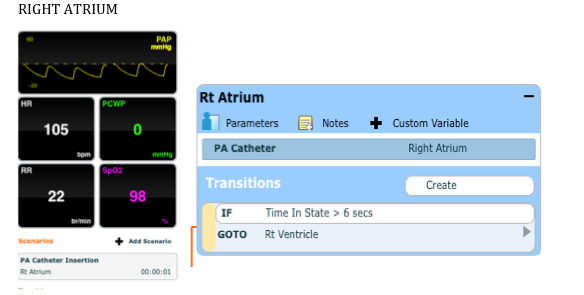
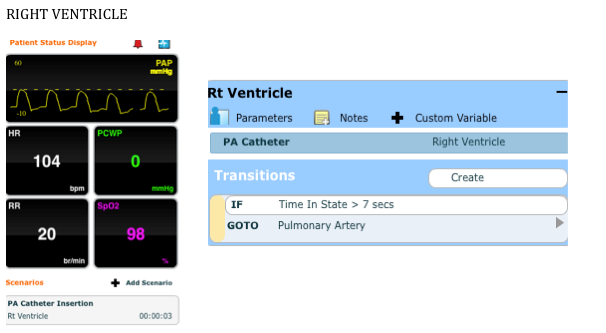
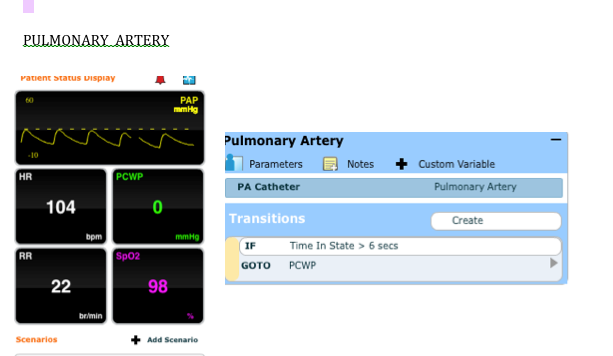
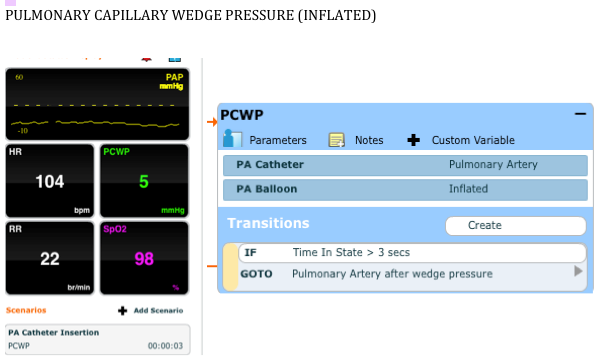
When running critical care scenarios, instructors may opt for a waveform that might signify a dislodged PA catheter as a way to prepare students for this type of situation that would need immediate attention in the clinical setting.
The Tips & Tricks section is located in our Resources section on caehealthcare.com. The Resources section of the website will also give you access to important and helpful documentation and video tutorials for your simulators. To access the Resources section, click on "Education" and then "Resources".
We hope you enjoyed this tip! Questions or comments? Please feel free to post below! If you would like more information on utilizing your CAE Healthcare simulator's features, visit the Video Tutorials section.
- The CAE Healthcare Academy