Worldwide Presence

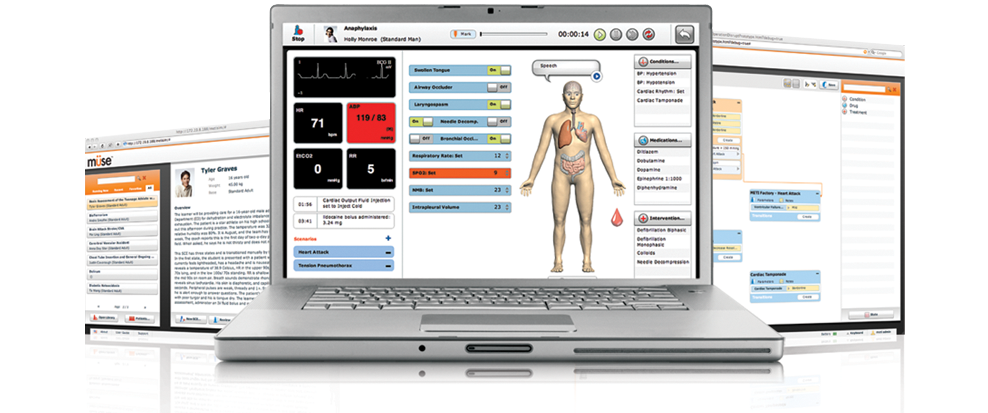
The intuitive, visual interface that simplifies patient simulation
Müse makes everything about running a simulator easier, faster and friendlier. With an eye-catching design, drag-and-drop functionality and intuitive organization, Müse offers all the essentials at your fingertips. Manage all the educational content, patients and curriculum for a patient simulator within one, easy-to-learn program.



The Müse difference - the power to customize
The Müse graphical interface provides instant visual control. Create a customized view of patient data in the patient status display. Select quick links to complex medical conditions, medications and interventions for the run screen. Control scenario progression or patient physiology, bookmark any part of a scenario timeline, or reset physiology or medications to facilitate learning.
Update to Müse 2.1 for added functionality that improves both learning and teaching experiences
Müse 2.1 offers navigation and and patient scenario information in 10 languages – English, French, Japanese, Korean, Russian, Polish, Spanish, Traditional Chinese, Simplified Chinese (navigation only) and now German! Instructors can upload patient records, lab reports, x-rays and audio and video files for learners to view within real-time scenarios. We've added functionality to make scenario development easier, including the ability to record events and save patient states. Müse 2.1 is fully supported within both Mac and Windows systems.


Develop patient scenarios with ease
Each copy of Müse comes with four licenses to develop patient scenarios on any Mac or PC when away from the instructor’s workstation. The scenario design feature enables instructors to import and create custom patient scenarios that are integrated with the CAE Healthcare physiological modeling. Müse is programmed with added features just for developers, such as the scenario state library, which enables one to save and retrieve states for reuse in other scenarios.


Simulate patient monitoring with TouchPro
Müse comes with TouchPro patient monitoring software that can display up to six waveform traces and four numeric vitals. TouchPro operates wirelessly on a touch-screen computer or tablet, and the screen can be customized for each scenario. The monitoring selections include ECGs, arterial, pulmonary and central venous blood pressures, optoplethysmograph, capnography, temperatures and more.
The Müse 2.0 upgrade allows users to simulate and display a 12-lead ECG. This added capability generates the following 12 waveforms: the 6 limb leads (I,II, III, aVF, aVL, avR), and the 6 precordial leads (V1-V6). The TouchPro patient monitor allows users to generate a 12-lead ECG report that replicates a standard 12-lead ECG print out, displaying 10 seconds of ECG traces with four vertically stacked traces.

Financing & Leasing
CAE Healthcare has partnered with Ascentium Capital to deliver custom financing and equipment leasing options for your program or institution.
Ascentium’s consultants have in-depth knowledge and experience tailoring solutions that meet the requirements of private, public or municipally owned hospitals, nursing, health sciences and medical schools and private EMT training companies.