 Worldwide Presence

Tips & Tricks - Tired of attaching the IV tubing and/or extension set to METIman ‘s shoulder(s)?
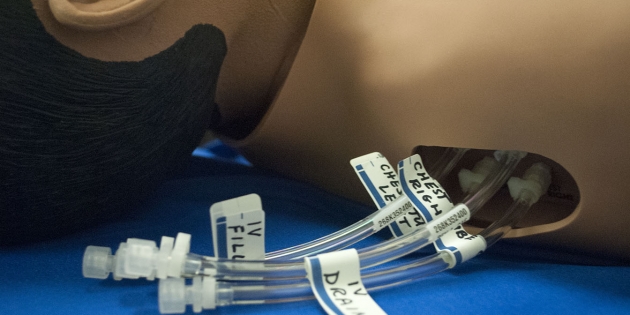
At CAE Healthcare, we care about our customers getting the most out of your simulator(s) easily and efficiently. That is why we have started an engaging new Tips & Tricks blog series. This series will cover multiple simulation solutions and will be updated often so don't forget to check back! For our third entry, we are offering a useful tip for METIman. For easy access to this and Tips & Tricks coming soon for other simulators, click here and subscribe to our RSS feed!
Please note: If you are using Safari 6, you will need to have an RSS Reader downloaded to subscribe.
Tips & Tricks #3 - Tired of attaching the IV tubing and/or extension set to METIman ‘s shoulder(s)?
For easier access to the fluid ports on METIman’s shoulder(s) attach one IV extension set with a dead-end cap to each port, label the appropriate extension set and leave in place. Cover all of the extension sets with a draw sheet when the bed is made. When it is time to use a port, simply attach the syringe or the IV tubing to the extension set.
The Tips & Tricks section is located in our Resources section on caehealthcare.com. The Resources section of the website will also give you access to important and helpful documentation and video tutorials for your simulators. To access the Resources section, click on "Education" and then "Resources".
We hope you enjoyed this tip! Questions or comments? Please feel free to post below! If you would like more information on utilizing your CAE Healthcare simulator's features, visit the Video Tutorials section.
- The CAE Healthcare Academy